
经过上篇,我启用了nignx HTTP2的支持。恰好我在工作中也遇到了一个HTTP2支持的问题,那个问题的原因是某个模块并不支持ALPN,所以无法实现对HTTP2的支持。
什么是ALPN呢?ALPN = Application Layer Protocol Negotiation,它其实是一个SSL(TLS)的extension。那这里就要先解释一下HTTP2和SSL之间的关系。
首先,HTTP2是可以不依赖于SSL来工作的,但是我们知道HTTP2是可以基于SSL来工作的。基于Best Practice,实际使用中没有人真的使用non-SSL的HTTP2。原因其实不难想 – 加密如果有的话当然好,但是要考虑加密解密速度。HTTP2本身就比HTTP1.1快,所以在性能上完爆HTTP1.1的情况下,增加加密就变成“既快又安全”。
在继续讲ALPN之前呢,再得提一个名词 – NPN。
NPN = Next Protocol Negotiation,也是一个SSL(TLS)的extension。好我们先看NPN在RFC draft-agl-tls-nextprotoneg-04 中的定义:
The Next Protocol Negotiation extension (NPN) is currently used to
   negotiate the use of SPDY [spdy] as an application level protocol on
   port 443, and to perform SPDY version negotiation.  However, it is
   not SPDY specific in any way.

Designers of new application level protocols are faced with a
   problem: there are no good options for establishing a clean transport
   for a new protocol and negotiating its use.  Negotiations on port 80
   will run afoul of intercepting proxies.  Ports other than 80 and 443
   are likely to be firewalled without any fast method of detection, and
   are also unlikely to traverse HTTP proxies with CONNECT. Negotiating
   on port 443 is possible, but may run afoul of MITM proxies and also
   uses a round trip for negotiation on top of the round trips for
   establishing the TLS connection.  Negotiation at that level is also
   dependent on the application level protocol, i.e.  the real world
   tolerance of servers to HTTP Upgrade requests.

Next Protocol Negotiation allows application level protocols to be
   negotiated without additional round trips and with clean fallback in
   the case of an unsupportive MITM proxy.
对比ALPN在RFC 7301中的定义:
Increasingly, application-layer protocols are encapsulated in the TLS
   protocol [RFC5246].  This encapsulation enables applications to use
   the existing, secure communications links already present on port 443
   across virtually the entire global IP infrastructure.
When multiple application protocols are supported on a single server- side port number, such as port 443, the client and the server need to negotiate an application protocol for use with each connection. It is desirable to accomplish this negotiation without adding network round-trips between the client and the server, as each round-trip will degrade an end-user's experience. Further, it would be advantageous to allow certificate selection based on the negotiated application protocol.This document specifies a TLS extension that permits the application layer to negotiate protocol selection within the TLS handshake. This work was requested by the HTTPbis WG to address the negotiation of HTTP/2 ([HTTP2]) over TLS; however, ALPN facilitates negotiation of arbitrary application-layer protocols.With ALPN, the client sends the list of supported application protocols as part of the TLS ClientHello message. The server chooses a protocol and sends the selected protocol as part of the TLS ServerHello message. The application protocol negotiation can thus be accomplished within the TLS handshake, without adding network round-trips, and allows the server to associate a different certificate with each application protocol, if desired.
可以看出,NPN和ALPN的第一个不同是,NPN适用于SPDY(尽管它特别声明不仅仅是给SPDY用),而ALPN是替代NPN的,适用于HTTP2。
两者都是在SSL握手的阶段,通过TLS extension的方式,将下一步可以使用的协议进行协商。比如
客户端在其Client Hello报文中加入ALPN(h2, spdy/3.1, http/1.1),服务器在收到这个报文后,从客户端推荐的列表中选择一个自己支持的(或者自己想要使用的),增加到Server Hello的ALPN中,如ALPN(h2)。那么在双方SSL握手成功之后,双方将使用HTTP2来进行通信。
同样的例子如果是NPN的情况,客户端将在Client Hello的报文中,仅增加一个NPN的标志;服务器收到这个报文后,将自己支持的协议列表通过Server Hello回复给客户端,如NPN(h2, spdy/3.1, http/1.1),之后客户端从中选择一个使用的再在下一个握手报文中回复给服务器。
看到区别了吗?NPN是客户端来决定使用哪个协议,而ALPN比NPN少一步,并且是由服务器来决定使用哪个协议。
不管是ALPN还是NPN,其实都是基于 – 1)使用SSL协议;2)使用TLS extension。
OpenSSL在1.0.1版本中支持了NPN,但是在1.0.2版本中才加入了对ALPN的支持。
所以,如果想支持ALPN,那么你的网站至少要1)支持HTTPS;2)OpenSSL的版本要高于1.0.2。
回到我的这个网站,很明显,不支持ALPN的原因是OpenSSL的版本,还是1.0.1。
那么我要做的就是升级OpenSSL的版本。
由于基础Kernel还是CentOS 6.9,所以不能通过Yum的方式更新OpenSSL(因为CentOS 6.x的Yum repository 最多只能是OpenSSL 1.0.1)。
所以我直接从OpenSSL的官网上下载了1.0.2分支中最新的代码1.0.2o。
编译和安装OpenSSL不难,我参考了这篇文章《how-to-install-openssl-on-centos》。
检查通过。
仅仅升级了OpenSSL还不是结束,此时Nginx还是使用之前OpenSSL 1.0.1编译的,因此若是想让Nignx支持ALPN,必须重新编译,并且使用OpenSSL 1.0.2联合编译。
在编译参数上,我使用了之前Nignx使用的参数:
./configure –prefix=/etc/nginx –sbin-path=/usr/sbin/nginx –modules-path=/usr/lib64/nginx/modules –conf-path=/etc/nginx/nginx.conf –error-log-path=/var/log/nginx/error.log –http-log-path=/var/log/nginx/access.log –pid-path=/var/run/nginx.pid –lock-path=/var/run/nginx.lock –http-client-body-temp-path=/var/cache/nginx/client_temp –http-proxy-temp-path=/var/cache/nginx/proxy_temp –http-fastcgi-temp-path=/var/cache/nginx/fastcgi_temp –http-uwsgi-temp-path=/var/cache/nginx/uwsgi_temp –http-scgi-temp-path=/var/cache/nginx/scgi_temp –user=nginx –group=nginx –with-compat –with-file-aio –with-threads –with-http_addition_module –with-http_auth_request_module –with-http_dav_module –with-http_flv_module –with-http_gunzip_module –with-http_gzip_static_module –with-http_mp4_module –with-http_random_index_module –with-http_realip_module –with-http_secure_link_module –with-http_slice_module –with-http_ssl_module –with-http_stub_status_module –with-http_sub_module –with-http_v2_module –with-mail –with-mail_ssl_module –with-stream –with-stream_realip_module –with-stream_ssl_module –with-stream_ssl_preread_module –with-cc-opt=’-O2 -g -pipe -Wall -Wp,-D_FORTIFY_SOURCE=2 -fexceptions -fstack-protector –param=ssp-buffer-size=4 -m64 -mtune=generic -fPIC’ –with-ld-opt=’-Wl,-z,relro -Wl,-z,now -pie’ –with-openssl=/root/tools/openssl-1.0.2o/
但是出现了这个错误:
/usr/bin/ld: /root/tools/openssl-1.0.2o//.openssl/lib/libssl.a(s23_meth.o): relocation R_X86_64_32 against `.rodata’ can not be used when making a shared object; recompile with -fPIC
/root/tools/openssl-1.0.2o//.openssl/lib/libssl.a: could not read symbols: Bad value
collect2: ld returned 1 exit status
make[1]: *** [objs/nginx] Error 1
make[1]: Leaving directory `/root/tools/nginx-1.14.0′
make: *** [build] Error 2
根据提示添加-fPIC并不能解决这个问题,经过在网上的查找,发现原来是没有编译OpenSSL动态库的原因,在编译参数里添加shared解决这个问题。
./configure –prefix=/etc/nginx –sbin-path=/usr/sbin/nginx –modules-path=/usr/lib64/nginx/modules –conf-path=/etc/nginx/nginx.conf –error-log-path=/var/log/nginx/error.log –http-log-path=/var/log/nginx/access.log –pid-path=/var/run/nginx.pid –lock-path=/var/run/nginx.lock –http-client-body-temp-path=/var/cache/nginx/client_temp –http-proxy-temp-path=/var/cache/nginx/proxy_temp –http-fastcgi-temp-path=/var/cache/nginx/fastcgi_temp –http-uwsgi-temp-path=/var/cache/nginx/uwsgi_temp –http-scgi-temp-path=/var/cache/nginx/scgi_temp –user=nginx –group=nginx –with-compat –with-file-aio –with-threads –with-http_addition_module –with-http_auth_request_module –with-http_dav_module –with-http_flv_module –with-http_gunzip_module –with-http_gzip_static_module –with-http_mp4_module –with-http_random_index_module –with-http_realip_module –with-http_secure_link_module –with-http_slice_module –with-http_ssl_module –with-http_stub_status_module –with-http_sub_module –with-http_v2_module –with-mail –with-mail_ssl_module –with-stream –with-stream_realip_module –with-stream_ssl_module –with-stream_ssl_preread_module –with-cc-opt=’-O2 -g -pipe -Wall -Wp,-D_FORTIFY_SOURCE=2 -fexceptions -fstack-protector –param=ssp-buffer-size=4 -m64 -mtune=generic -fPIC’ –with-ld-opt=’-Wl,-z,relro -Wl,-z,now -pie’ –with-openssl=/root/tools/openssl-1.0.2o/ shared
编译后安装,使用Nignx -V 命令查看版本,确认已经使用OpenSSL 1.0.2o编译:
[root@xxxxxxxx nginx-1.14.0]# nginx -V
nginx version: nginx/1.14.0
built by gcc 4.4.7 20120313 (Red Hat 4.4.7-18) (GCC)
built with OpenSSL 1.0.2o 27 Mar 2018
TLS SNI support enabled
configure arguments: –prefix=/etc/nginx –sbin-path=/usr/sbin/nginx –modules-path=/usr/lib64/nginx/modules –conf-path=/etc/nginx/nginx.conf –error-log-path=/var/log/nginx/error.log –http-log-path=/var/log/nginx/access.log –pid-path=/var/run/nginx.pid –lock-path=/var/run/nginx.lock –http-client-body-temp-path=/var/cache/nginx/client_temp –http-proxy-temp-path=/var/cache/nginx/proxy_temp –http-fastcgi-temp-path=/var/cache/nginx/fastcgi_temp –http-uwsgi-temp-path=/var/cache/nginx/uwsgi_temp –http-scgi-temp-path=/var/cache/nginx/scgi_temp –user=nginx –group=nginx –with-compat –with-file-aio –with-threads –with-http_addition_module –with-http_auth_request_module –with-http_dav_module –with-http_flv_module –with-http_gunzip_module –with-http_gzip_static_module –with-http_mp4_module –with-http_random_index_module –with-http_realip_module –with-http_secure_link_module –with-http_slice_module –with-http_ssl_module –with-http_stub_status_module –with-http_sub_module –with-http_v2_module –with-mail –with-mail_ssl_module –with-stream –with-stream_realip_module –with-stream_ssl_module –with-stream_ssl_preread_module –with-cc-opt=’-O2 -g -pipe -Wall -Wp,-D_FORTIFY_SOURCE=2 -fexceptions -fstack-protector –param=ssp-buffer-size=4 -m64 -mtune=generic -fPIC’ –with-ld-opt=’-Wl,-z,relro -Wl,-z,now -pie’ –with-openssl=/root/tools/openssl-1.0.2o/
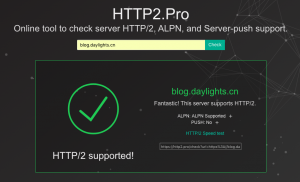
此时再去HTTP2.Pro查询网站状态,会显示支持HTTP2并且支持ALPN。
HTTP2 PUSH是HTTP2服务器端的一个功能,可选,没有必要一定要用。