
AWS SMS (Server Migration Service) 是Migration的一部分。它主要解决的是什么问题呢?虚拟机。
SMS的输入端是VMWare的vSphere,或者Microsoft的Hyper-V/SCVMM,再或者是Azure的VM。总之就是虚拟机啦。它的目的是快速地把On-Prem上的虚拟机群,重新部署到AWS上。
那SMS的输出端就是EC2咯?差不多。或者说是AMI,有了AMI你想建几个EC2 Host就建几个。但其实SMS的输出应该理解为一套环境 – 原来你的vSphere也不只是一些虚拟机呀,而是整个Host包括网络,迁移到AWS上要还能使用。
想一想,On-Prem的VM迁移到AWS上只是EC2,那对于整体的管理用什么好?对了,CloudFormation。
用下张图来说明比较明确:
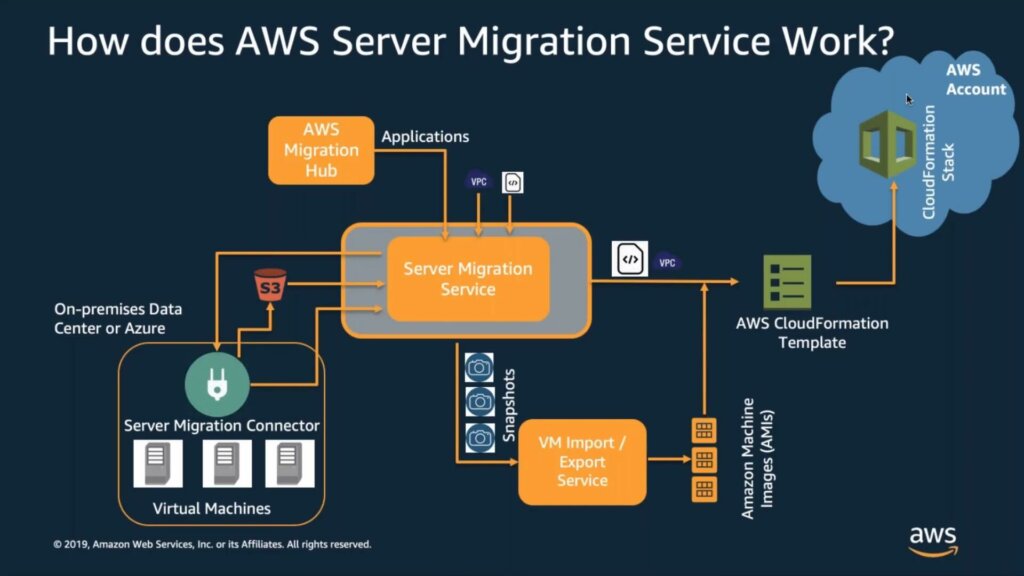
图片截自《https://aws.amazon.com/server-migration-service/》
先让我吐槽一点:之前我们看到的Migration,不论在源和目标处,都会有个Migration Endpoint。SMS号称是Agent-less,没有Agent,我还一度对其如何实现的深感兴趣,以为和VMWare关系好所以内置了什么endpoint呢,结果,解决方案是你需要在你的vSphere或者Hyper-V(或者Azure)上安装一台Virtual Appliance,也就是Server Migration Connector。魔法什么的还是不存在的。
Server Migration Connector的一个主要功能,是将当前vSphere或者Hyper-V(或者Azure)上的VM一个一个地创建Snapshot,并且将他们上传至S3保存。这也是整个Migration的第一步。
第二步,SMS将调用另一个服务:VM Import/Export Service,来将这些Snapshot 转化(convert)成 AMI。至此VM的迁移就完成了。
刚才说了,整个迁移是对环境的迁移,不仅仅是VM。因此SMS参考的输入端还有网络配置(VPC),以及Application的配置(从AWS Migration Hub上来),整体攒补攒补,生成AWS CloudFormation Template。最后再将该Template应用到Stack上,完成。
之前我说过,敢称自己为Migration Service的,就一定支持持续地迁移,而不是仅仅一次。SMS也不例外。并且在首次replication之后,之后的replication都是增量,也就是incremental replication。
再一个经典话题,加密。SMS生成的AMI可以是加密的。
插一句,VMWare用户还可以用vMotion for VMWare Cloud on AWS。我只是听说,没有深入了解过。
恩,看了一个实际的Demo,感觉还是和理论上的理解有些出入。
实际的Case可能是,将某个Application迁移到AWS上。
我们比如说,这个Application是个网站,那在vSphere上,它可能有几台虚拟机来运行它。打比方说有两台,一台专门是数据库,一台专门是服务器和前台代码。
那么在迁移这个Application时,需要迁移的是这两台VM。在SMS里会以Application为单位,来进行操作。
创建新的Application setting -> 选择需要的servers -> 将Server加入组、tag之类。至此将Application和需要的VM联系起来。
然后创建replication的配置,这里和移动VM的过程相同,需要配置比如多久replica一次?AMI要不要加密?license之类的。填写完之后,replication就准备好了。
开始replication吗?不。像现在以Application为单位的情况,是不能够仅仅迁移VM就够了的,还得要迁移网络啊,配置EC2规格啊,还有一些脚本需要调整系统参数啊(比如说,appliance监听的是原IP地址,那新的EC2启动后,要把监听的地址改成EC2最新的地址)。这些再配置好了,才叫准备好了。
准备好了,开始replication。Replication完成后,那两台VM就变成了AMI。然后Launch Application,这个时候,你之前所有的配置,都会被写入到CloudFormation的template里,然后被启用于stack。
使用Application为单位来Migration,远远好于直接无脑迁移VMs。那样迁移后的VM,里面的应用不能保证还能使用。
Frequent questions:
Q: What operating systems does AWS Server Migration Service support?
AWS Server Migration Service supports migrating Windows Server 2003, 2008, 2012, and 2016, and Windows 7, 8, and 10; Red Hat Enterprise Linux (RHEL), SUSE/SLES, CentOS, Ubuntu, Oracle Linux, Fedora, and Debian Linux operating systems.
Q: How long can I replicate my server volumes from on-premises to AWS?
You can replicate your on-premises servers to AWS for up to 90 days (per server). Usage time is calculated from the time a server replication begins until you terminate the replication job. After 90 days, your replication job will be automatically terminated. If you want to increase this limit, please discuss your use case with the AWS Support team.
Q: How many AWS Server Migration Service Connectors do I need to install?
You need to install one AWS Server Migration Service Connector for each VMware vCenter environment.
Q: Are server volumes securely transferred from my data center to AWS?
Yes. Replicated server volumes are encrypted in transit by Transport Layer Security (TLS).
References:
https://aws.amazon.com/server-migration-service/
https://docs.aws.amazon.com/server-migration-service/latest/userguide/server-migration.html